Map and Set in JavaScript: Why { } and [ ] Aren't Always Enough
![Map and Set in JavaScript: Why { } and [ ] Aren't Always Enough](https://cdn.hashnode.com/uploads/covers/69413d2ffd5a397514bc42f5/a3470fe0-acbb-402e-b52d-41d393bcb536.png)
Why does {} sometimes let you overwrite data silently?
Try this in your console:
const user = {};
user[1] = "Sahil";
user["1"] = "Piyush";

console.log(user); // { '1': 'Piyush' }
Two different-looking keys, one value gone. Many beginners think objects are the safe, default way to store any key-value data in JavaScript.
That's not fully true. Objects were built for records with known string keys, not for general-purpose key-value storage. For that job, JavaScript gives us something better: Map.
Map is a built-in JavaScript collection that stores key-value pairs, where keys can be of any type, and insertion order is always preserved.
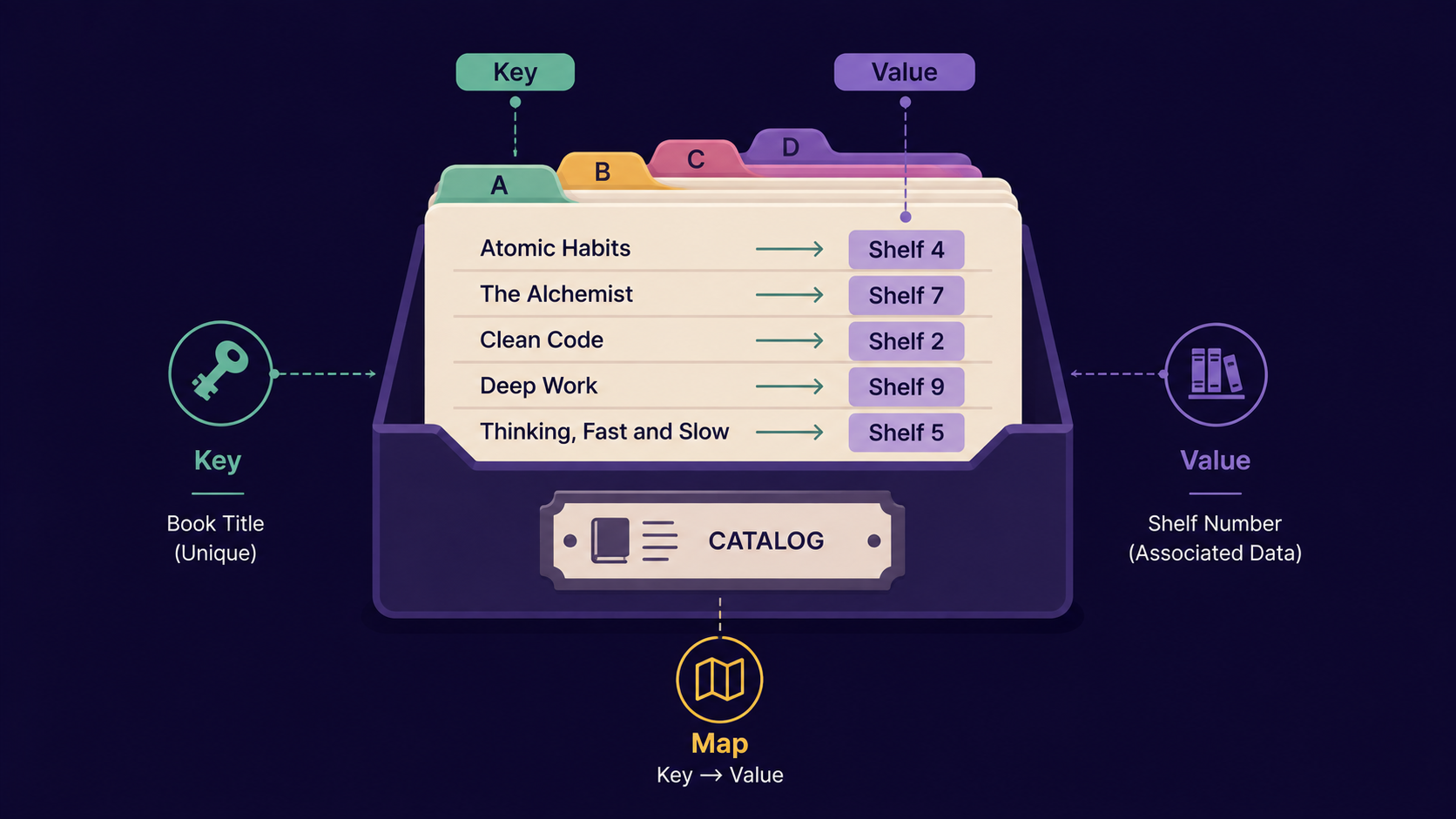
Analogy: The School Library System
Think of your school library.
The catalog register links a book title to its shelf number. One title, one shelf, no confusion.
The membership list tracks students who are library members. No student ID appears twice - the system simply won't allow it.
The catalog register is your Map. The membership list is your Set. Keep this pair in mind, everything below maps back to it.
| Library concept | JavaScript concept |
|---|---|
| Catalog register | Map |
| Book title (any label) | Map key |
| Shelf number | Map value |
| Membership list | Set |
| Student ID (no duplicates) | Set value |
How Map actually works
Create it:
const catalog = new Map();Add an entry:
catalog.set("Atomic Habits", "Shelf 4");Read an entry:
catalog.get("Atomic Habits");→"Shelf 4"Check existence:
catalog.has("Atomic Habits");→trueRemove an entry:
catalog.delete("Atomic Habits");Count entries:
catalog.size
const catalog = new Map();
catalog.set("Atomic Habits", "Shelf 4");
catalog.set(101, "Shelf 9"); // number key, not a string
catalog.set(true, "Shelf 2"); // boolean key

console.log(catalog.get(101)); // "Shelf 9"
console.log(catalog.size); // 3
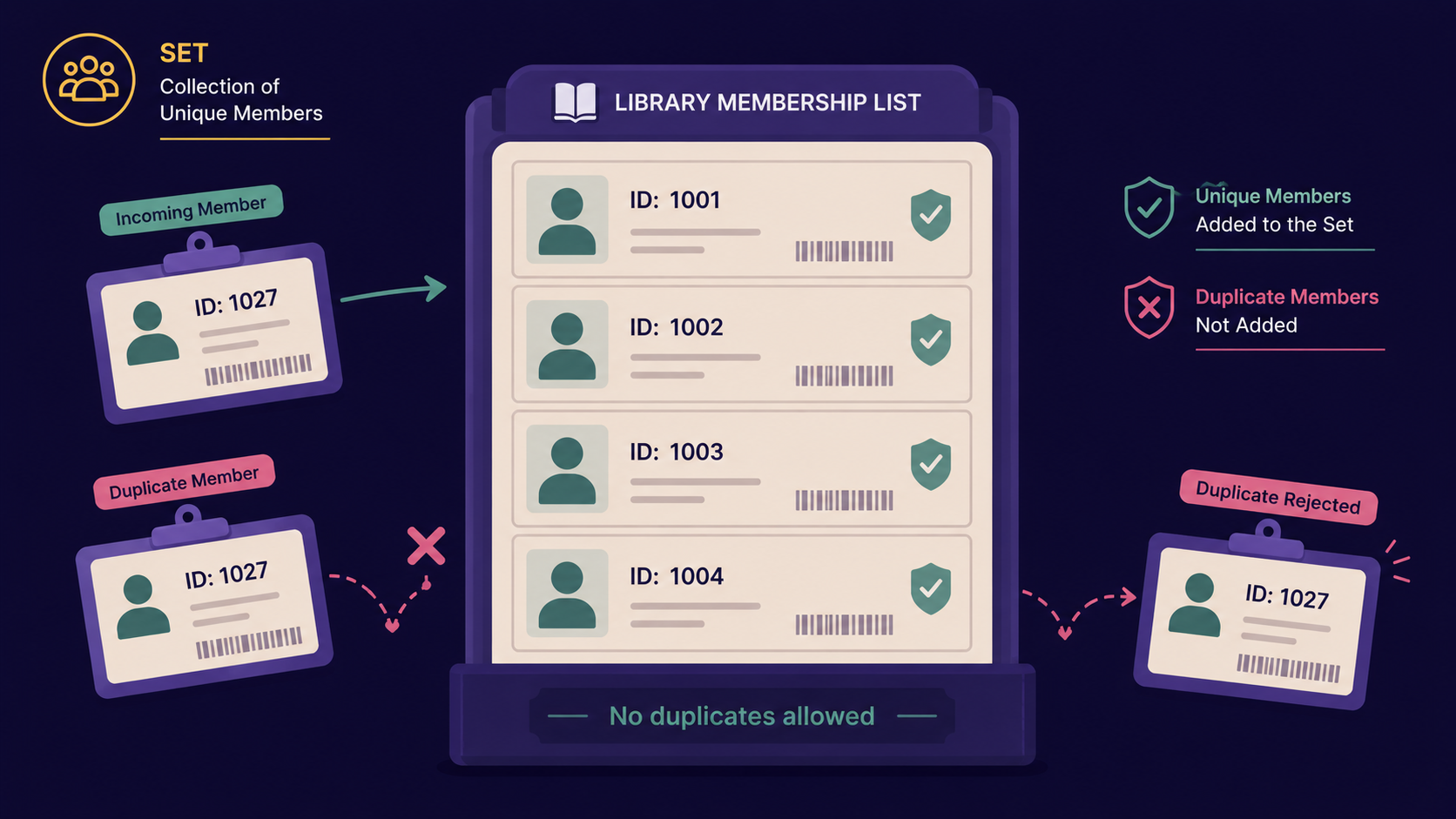
We're skipping Map iteration methods like forEach and entries() for now - confidence with set, get, and has comes first.
Why do we need Map at all?
Plain objects have three quiet limitations:
Keys get forced to strings.
user[1]anduser["1"]are the same key.No built-in size. You'd write
Object.keys(user).lengthevery time.Inherited properties can leak in. An object always carries baggage from its prototype.
Map removes all three problems at once. Any value can be a key, .size is instant, and a Map holds nothing you didn't put there yourself.
Important Rule
Map keys are compared using SameValueZero, not ===. The one practical difference: NaN is treated as equal to itself as a Map key, even though NaN === NaN is false everywhere else in JavaScript.
After knowing how to map any key to any value, the next question is: what if we only care about the keys themselves, with no values, and no duplicates allowed?
What Set actually is?
Set is a built-in JavaScript collection that stores a list of values where every value must be unique.
Back to the library: it's the membership list. Try to add the same student ID twice, and the second attempt simply does nothing.
const memberIDs = new Set();
memberIDs.add(101);
memberIDs.add(102);
memberIDs.add(101); // ignored, already present

console.log(memberIDs.size); // 2
console.log(memberIDs.has(102)); // true
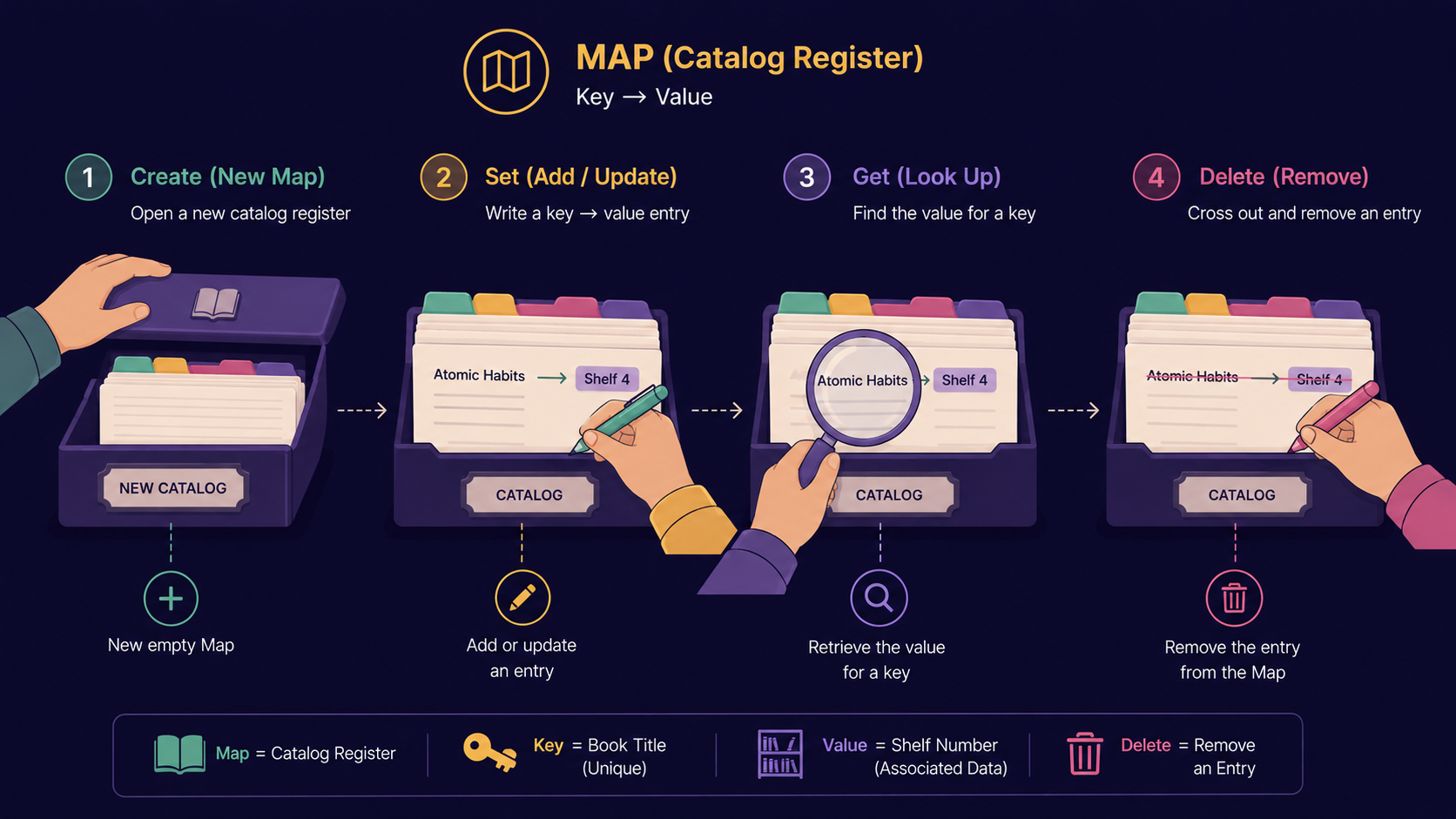
How Set actually works
Create it:
const memberIDs = new Set();Add a value:
memberIDs.add(101);Check existence:
memberIDs.has(101);→trueRemove a value:
memberIDs.delete(101);Count values:
memberIDs.size
Why do we need Set at all?
Arrays let duplicates pile up freely, and checking whether a value already exists means scanning the whole array with indexOf, one item at a time.
const ids = [101, 102, 101, 103];
const unique = [...new Set(ids)];

console.log(unique); // [101, 102, 103]
That single line removes duplicates from an array. No loop, no manual comparison.
Important Rule
A Set only guarantees uniqueness for primitive values compared by value, and objects compared by reference. Two separate objects with identical properties are still two different Set entries, because they're two different references in memory.
Now that Map and Set are each clear on their own, the real question beginners ask is: when do I reach for these instead of the tools I already know?
Map vs Object
| Map | Object | |
|---|---|---|
| Key types | Any value | String or Symbol only |
| Order | Insertion order guaranteed | Mostly insertion order, not guaranteed |
| Size | .size property |
Object.keys(obj).length |
| Iteration | Directly iterable | Needs Object.keys/values/entries |
| Prototype | No inherited keys | Inherits from Object.prototype |
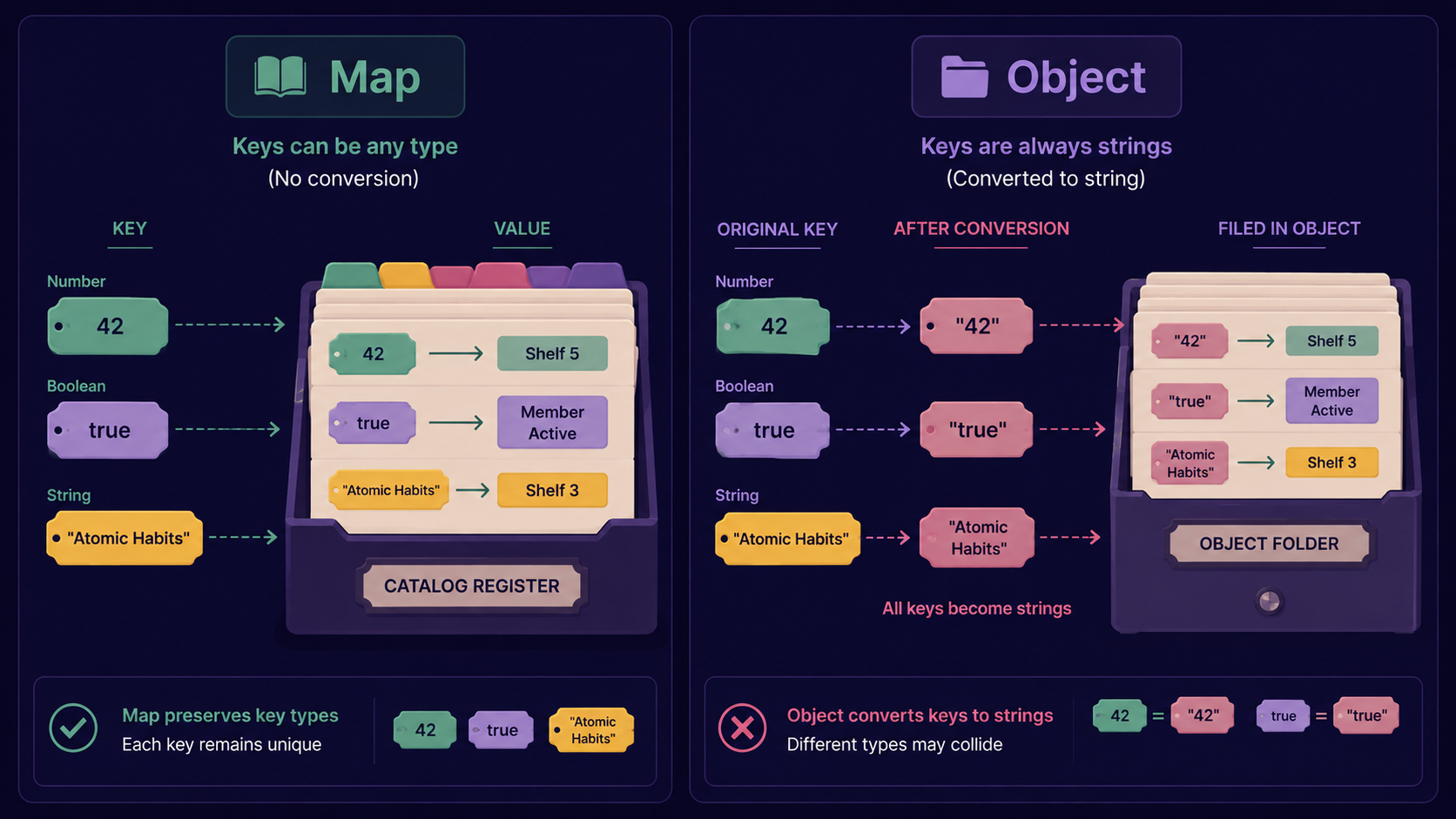
Set vs Array
| Set | Array | |
|---|---|---|
| Duplicates | Never allowed | Allowed freely |
| Lookup | .has(), fast |
.includes(), scans every item |
| Order | Insertion order | Index order |
| Best for | Uniqueness checks | Ordered lists, duplicates okay |
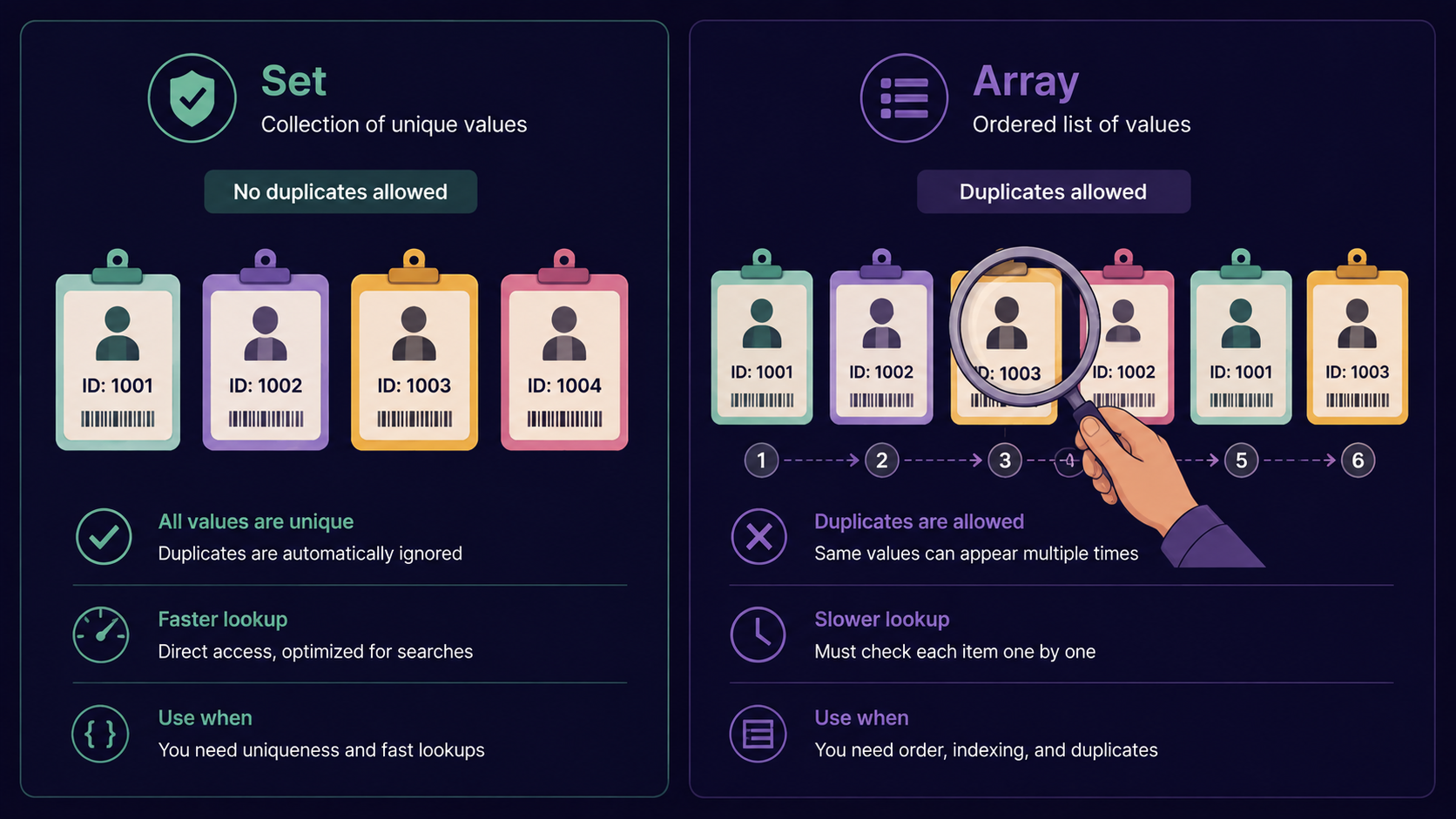
When to use Map and Set
Reach for Map when your keys aren't plain strings, or when you need a guaranteed size and order - caching by object reference, counting occurrences, storing config by dynamic keys.
Reach for Set when you need to guarantee no duplicates, or want a fast existence check - deduplicating arrays, tracking visited items, tag lists.
Stick with Object for simple, fixed-shape records: a user profile, a config object with known fields.
Stick with Array when order and duplicates both matter: a list of orders, a sequence of events.
How all of these work together
A real app often uses all four at once. Imagine tracking online users in a chat app:
A Set of currently online user IDs (uniqueness, fast lookup).
A Map from user ID to last-seen timestamp (any key type, instant size).
Each individual user is still a plain Object (fixed fields: name, avatar, status).
The chat history is still an Array (ordered, duplicates are fine - same message text can repeat).

None of these tools replace each other. They solve different shapes of the same problem: how you store and retrieve data.
Conclusion
Map stores key-value pairs where keys can be any type, with guaranteed order and instant size.
Set stores only unique values, with fast existence checks.
Objects are best for fixed-shape records with string keys.
Arrays are best for ordered lists where duplicates are fine.
Choosing between them comes down to one question: do I need uniqueness, or do I need arbitrary keys?
If this felt like a lot of new territory, that's okay. What matters is understanding why each tool exists, not memorizing every method today.
What's Next?
The next article picks up spread/rest operators - how JavaScript lets you unpack Maps, Sets, arrays, and objects in one clean line, and why you've already seen a hint of it in [...new Set(ids)] above.
If you find this helpful, drop a comment or reaction.