How Do JavaScript String Methods Actually Work? (And How to Build Your Own)
Have You Ever Wondered What Happens Inside .trim()?
You write " hello ".trim(), hit enter, and the spaces vanish.
Many beginners think this is just "JavaScript magic" - a black box you memorize and move on from. That's not true.
Every string method is just a small, well-defined algorithm someone wrote once. Once you see the algorithm, you stop memorizing methods and start understanding them.
A string method is a function attached to every string that reads or transforms its characters and returns a result - without changing the original string.
Analogy: The Tailor's Shop
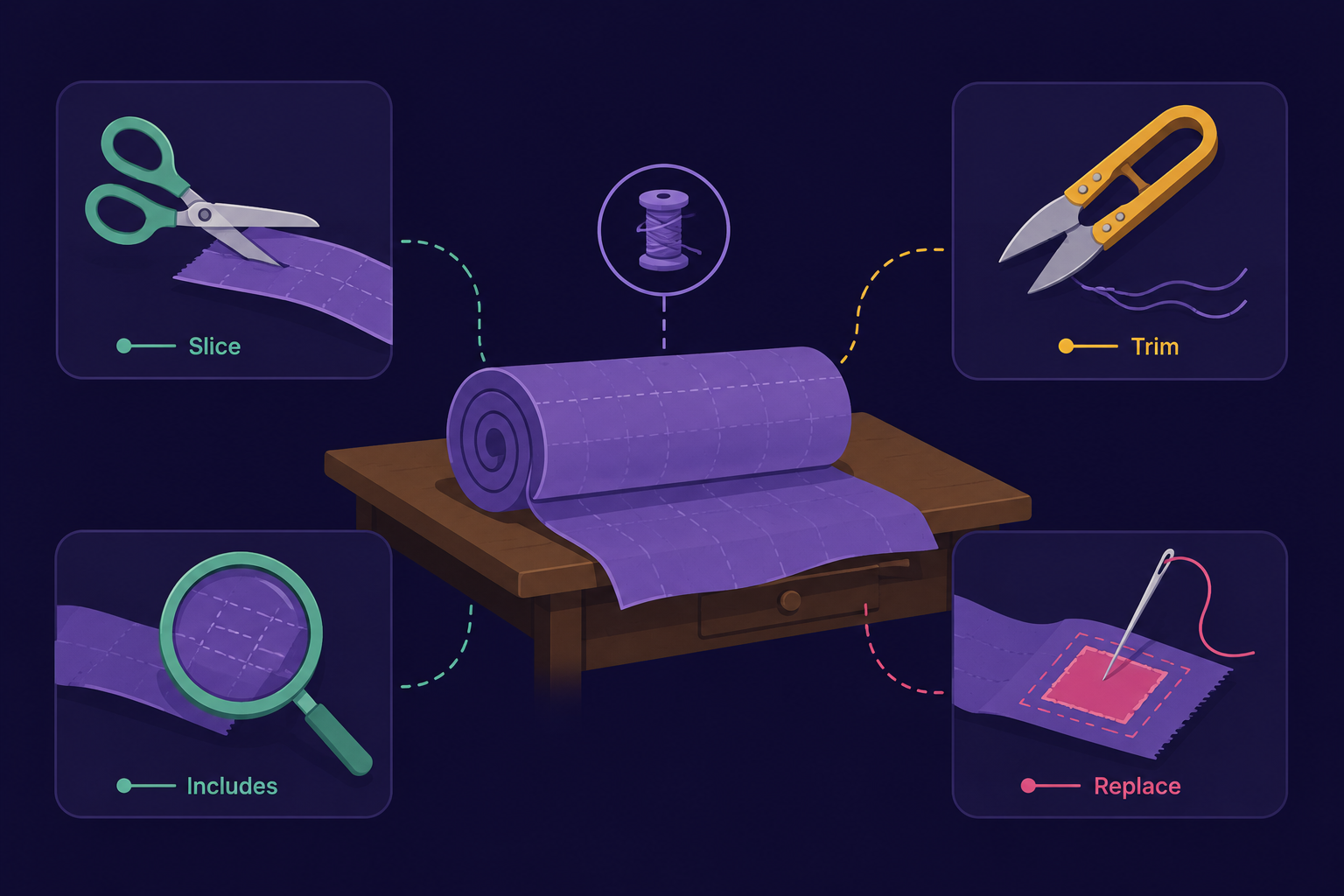
Think of a string as a roll of fabric, and string methods as the tools on a tailor's table.
String = the roll of fabric
.slice()= the scissors, cutting out a piece.trim()= trimming loose threads off both ends.includes()= holding the fabric up to check if a certain pattern exists on it.replace()= unpicking one patch and sewing in another
Here's the part beginners miss: the tailor never damages the original roll of fabric. He always works on a copy of the piece he's cutting. The original roll stays exactly as it was.
That's exactly how strings behave in JavaScript.
Important Rule: Strings are Immutable
Every string method returns a new string. It never edits the original one in place.
let name = "  Sahil  ";
let trimmed = name.trim();

console.log(name);    // "  Sahil  " (unchanged)
console.log(trimmed); // "Sahil"
This single rule explains almost every "why doesn't my code work" moment beginners hit with strings. If you forget to store the return value, the transformation is lost.
How a String Method Actually Works, Step by Step
Let's open the black box using .trim() as our example.
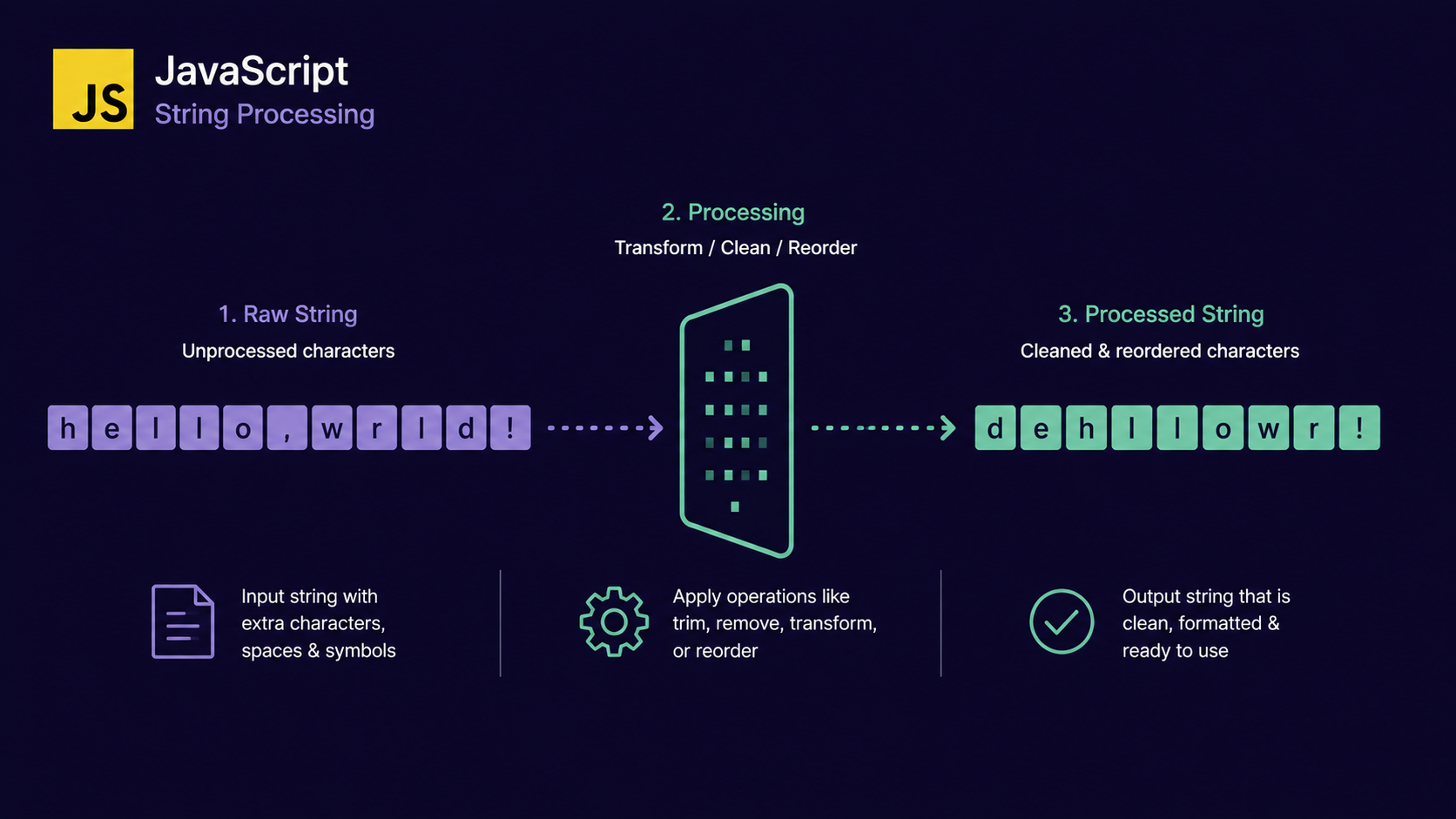
Scan from the left - move a pointer forward until you hit a character that isn't whitespace.
Scan from the right - move a pointer backward until you hit a character that isn't whitespace.
Slice the middle - extract everything between the two pointers into a brand-new string.
Return the new string - the original is left untouched.
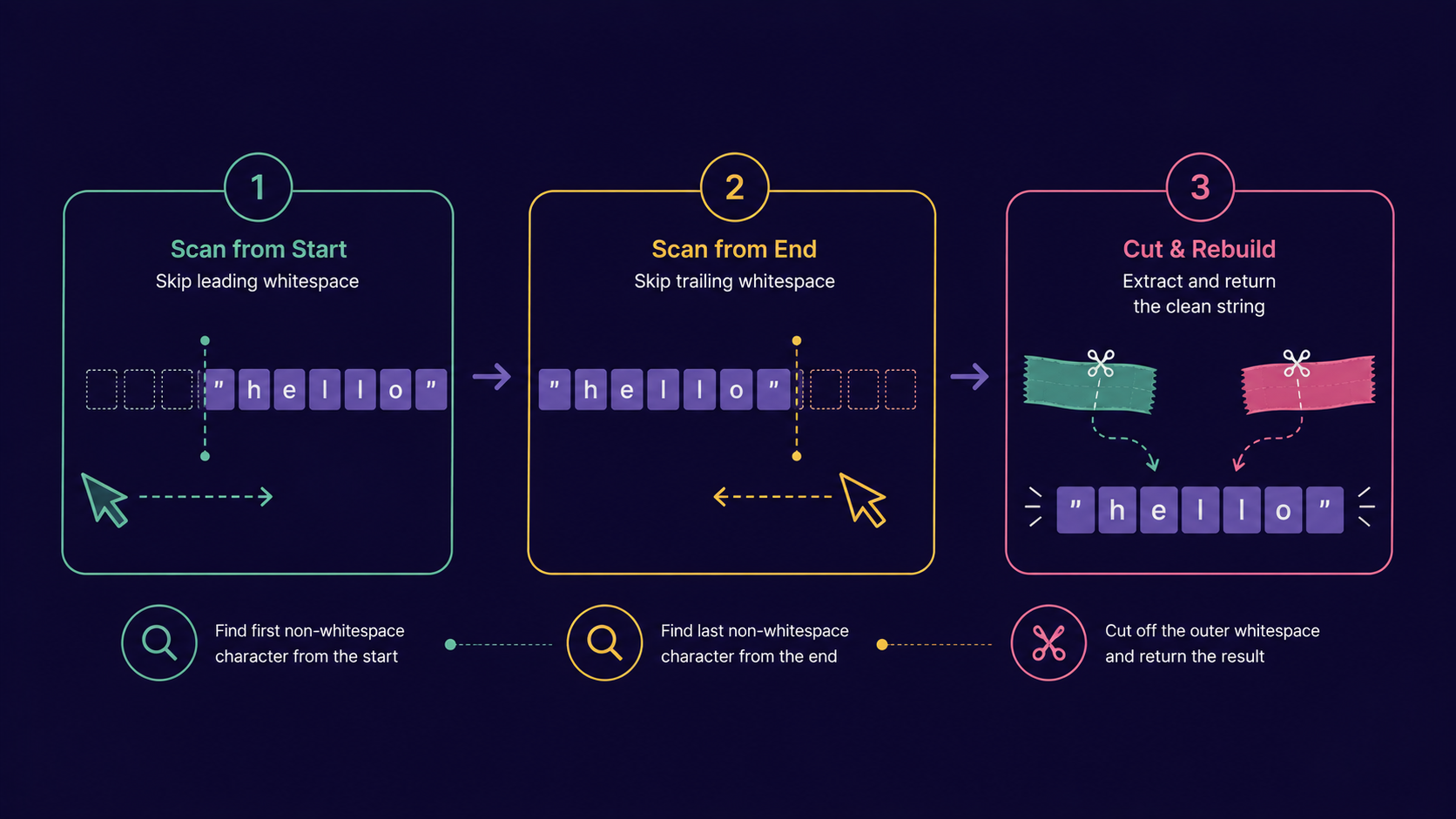
Every string method follows this same pattern: read characters → decide what to keep → build a new string → return it.
Why Bother Writing Your Own Version?
If the built-in method already exists, why write it yourself? Two honest reasons:
Interviews test this constantly. "Implement your own
.trim()" or "writeincludeswithout usingincludes" are classic rounds.Understanding internals makes you a better debugger. When you know how a method scans a string, you can predict edge cases instead of guessing.
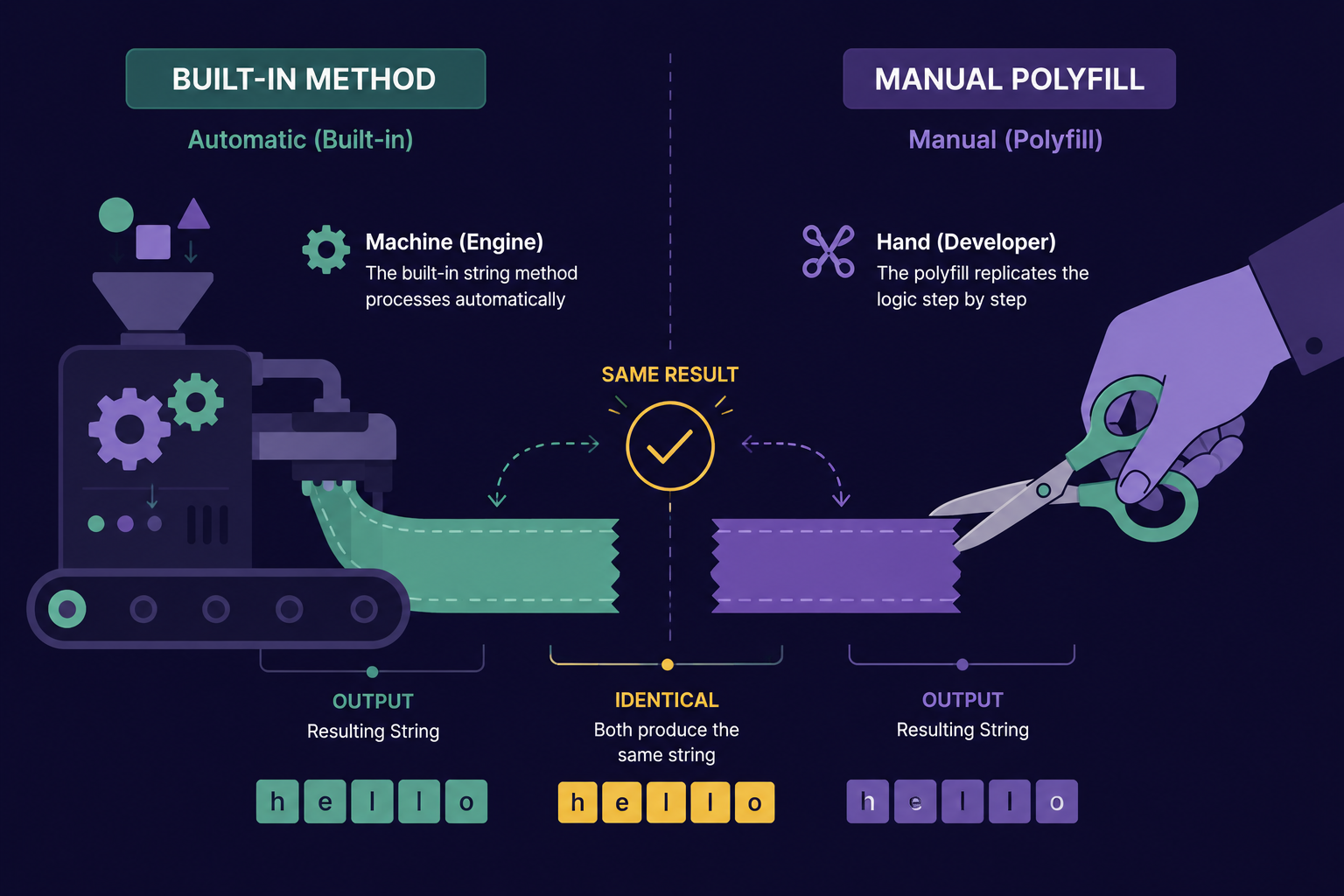
A version you build yourself, to replace or explain a built-in, is called a polyfill.
A polyfill is code that manually reproduces the behavior of a built-in feature - usually written to understand it, or to support environments where the built-in doesn't exist.
Analogy: The Tailor's Shop, Continued
Picture the tailor's favourite cutting machine breaking down mid-order. He doesn't stop working - he picks up scissors and does the exact same cut by hand, thread by thread.
The customer gets an identical result either way. The machine is faster; the hand-cut version proves the tailor actually understands the cut.
That's what a polyfill is: the manual version of a tool you'd normally trust a machine for.
Building Simple String Polyfills
Here's how three common methods work under the hood, rebuilt from scratch.
- Polyfill for
.trim()
function myTrim(str) {
    let start = 0;
    let end = str.length - 1;

    while (str[start] === " ") {
        start++;
    };

    while (str[end] === " ") {
        end--;
    }

    return str.slice(start, end + 1);
}

console.log(myTrim("  hello  ")); // "hello"
- Polyfill for
.includes()
function myIncludes(str, target) {
    for (let i = 0; i <= str.length - target.length; i++) {
        if (str.slice(i, i + target.length) === target) {
            return true;
        }
    }

    return false;
}

console.log(myIncludes("hello world", "world")); // true
- Polyfill for
.reverse()- style string reversal (strings don't have a native.reverse())
function myReverse(str) {
    let result = "";
    for (let i = str.length - 1; i >= 0; i--) {
        result += str[i];
    }

    return result;
}

console.log(myReverse("Sahil")); // "lihaS"
We avoid regular expressions and advanced flags here - confidence in the loop logic comes first.
The Most used String Methods, at a Glance
| S.No. | Method | What it does | Example |
|---|---|---|---|
| 1. | .length |
Counts characters | "hello".length → 5 |
| 2. | .slice(start, end) |
Extracts a portion | "hello".slice(1, 3) → "el" |
| 3. | .trim() |
Removes edge whitespace | " hi ".trim() → "hi" |
| 4. | .toUpperCase() |
Converts to uppercase | "hi".toUpperCase() → "HI" |
| 5. | .toLowerCase() |
Converts to lowercase | "HI".toLowerCase() → "hi" |
| 6. | .includes(sub) |
Checks if substring exists | "hello".includes("ell") → true |
| 7. | .indexOf(sub) |
Finds first position | "hello".indexOf("l") → 2 |
| 8. | .replace(old, new) |
Swaps first match | "hi hi".replace("hi", "bye") → "bye hi" |
| 9. | .split(sep) |
Turns string into an array | "a,b".split(",") → ["a","b"] |
| 10. | .concat(str2) |
Joins two strings | "a".concat("b") → "ab" |
| 11. | .repeat(n) |
Repeats the string | "ab".repeat(2) → "abab" |
| 12. | .charAt(i) |
Gets character at index | "hi".charAt(0) → "h" |
| 13. | .padStart(len, ch) |
Pads from the left | "5".padStart(2, "0") → "05" |
| 14. | .startsWith(sub) |
Checks the beginning | "hello".startsWith("he") → true |
| 15. | .endsWith(sub) |
Checks the end | "hello".endsWith("lo") → true |
Common Interview String Problems
These show up again and again - practice them once you're comfortable with the polyfills above:
Reverse a string without using
.reverse()(strings don't have it natively anyway)Check if a string is a palindrome (reads the same forwards and backwards)
Count vowels or specific characters in a string
Find the first non-repeating character
Check if two strings are anagrams of each other
Implement
.trim()or.includes()manually, as we did aboveCompress a string -
"aaabb"→"a3b2"
Why This Matters More Than Memorizing Method Names
Anyone can look up a method name. What separates a confident developer from a beginner copy -pasting from docs is knowing why the method behaves the way it does.
Once you understand that every string method is just a loop with a specific goal, interview problems stop feeling like separate topics - they're just polyfills you haven't written yet.
Conclusion
String methods transform strings but never mutate the original.
Every method follows the same pattern: read, decide, build a new string, return.
A polyfill is your own hand-built version of a built-in method.
Understanding internals directly prepares you for common interview questions.
If this felt like a lot at once, that's okay. What matters is understanding the flow - the same read → decide → build → return pattern shows up in almost every string method you'll ever use.
If you find this helpful, drop a comment or reaction.
![Map and Set in JavaScript: Why { } and [ ] Aren't Always Enough](https://cdn.hashnode.com/uploads/covers/69413d2ffd5a397514bc42f5/a3470fe0-acbb-402e-b52d-41d393bcb536.png)