Sessions vs JWT vs Cookies: How Does a Server Remember You?
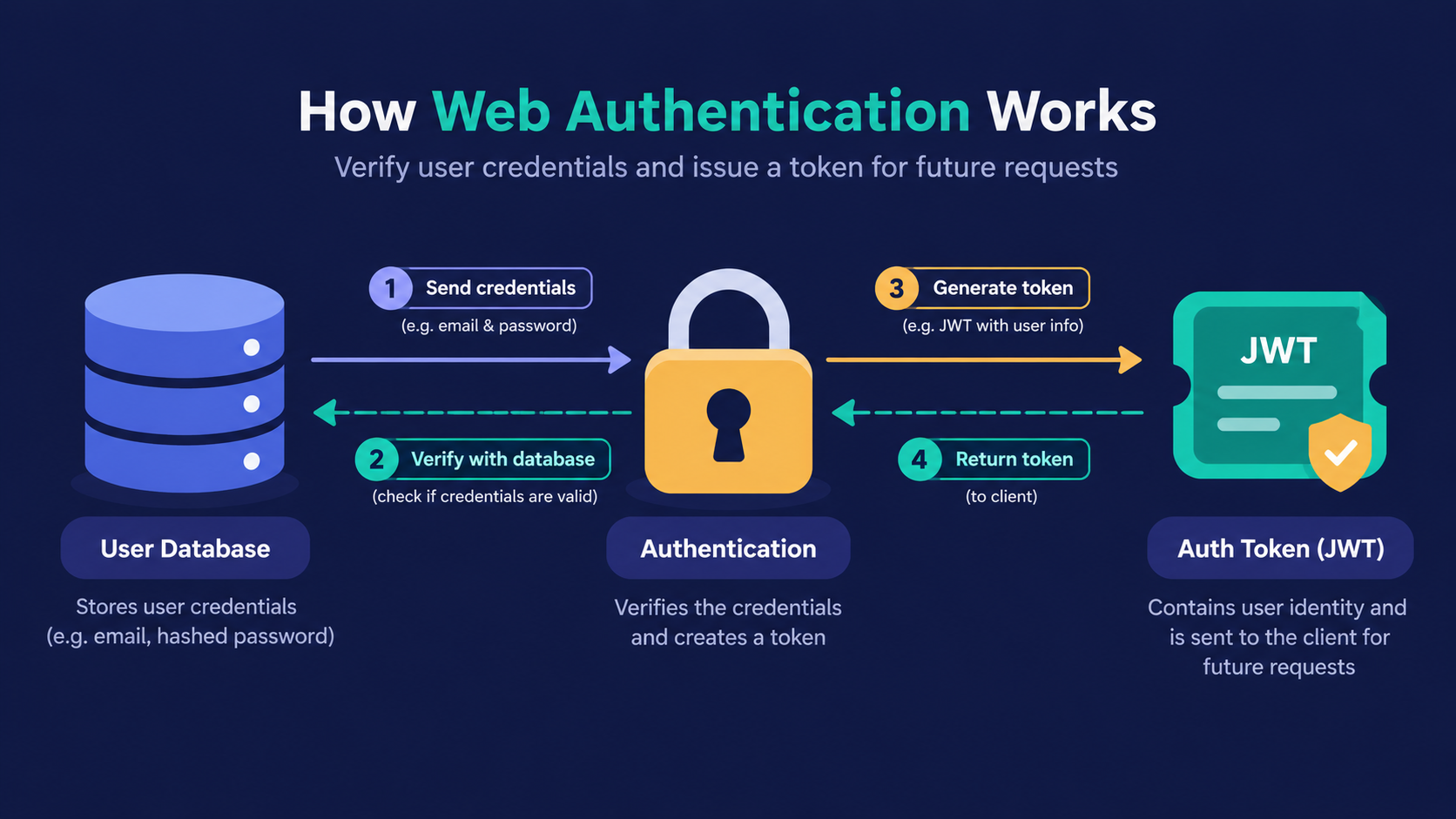
How does a server remember that you are logged in?
You log in once. Then you open ten more pages, and the app never asks for your password again.
Many beginners think the server simply "remembers" them. That's not true. HTTP has no memory, and every request arrives like a stranger at the door.
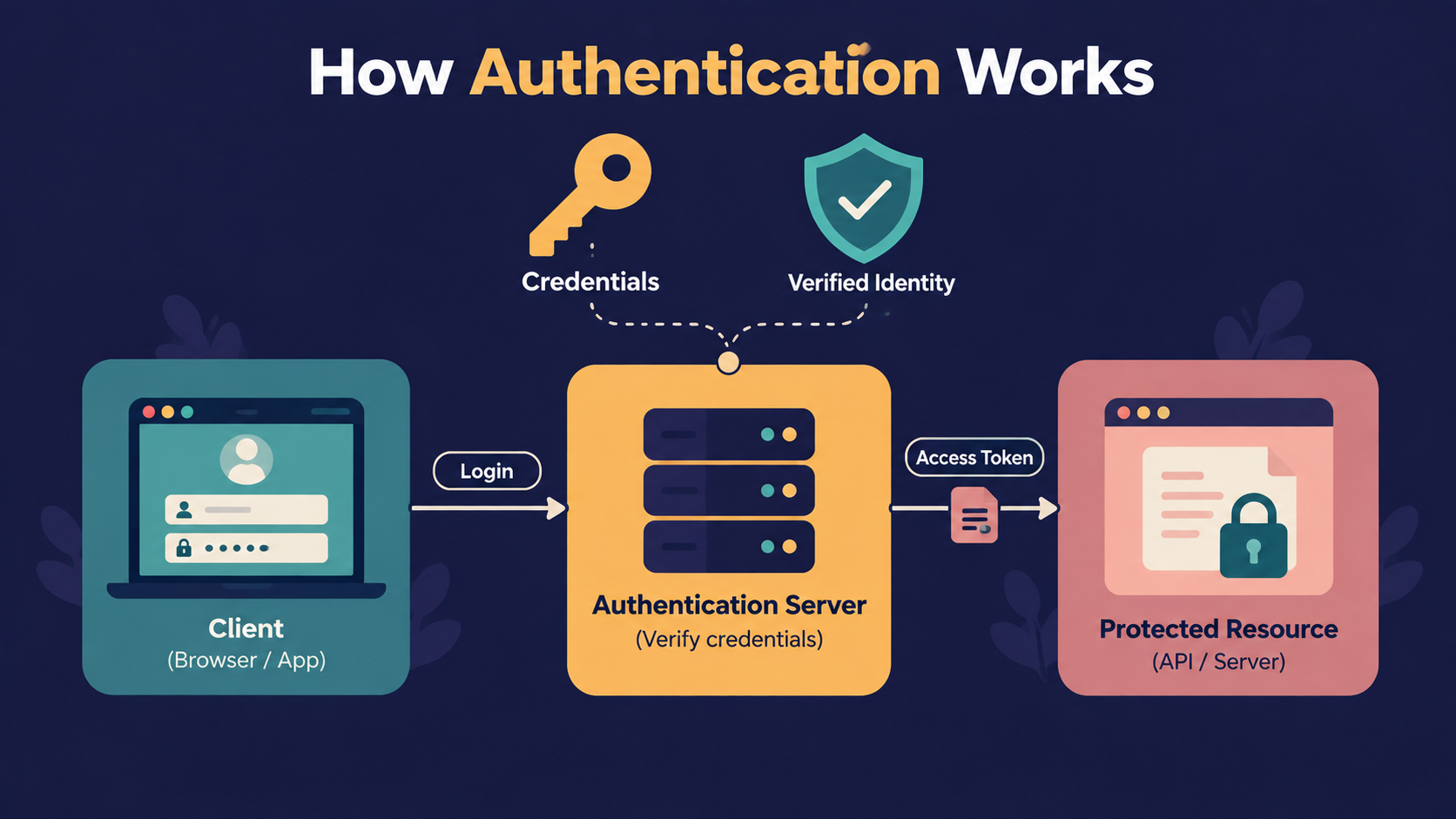
So authentication is really one problem: how do we prove who is calling on every single request? Sessions and JWT are two different answers. Cookies are just one way to carry either answer.
We will skip security protocols here. Our goal is to understand the choice, not every defence around it.
Before comparing anything, we need one picture in our head.
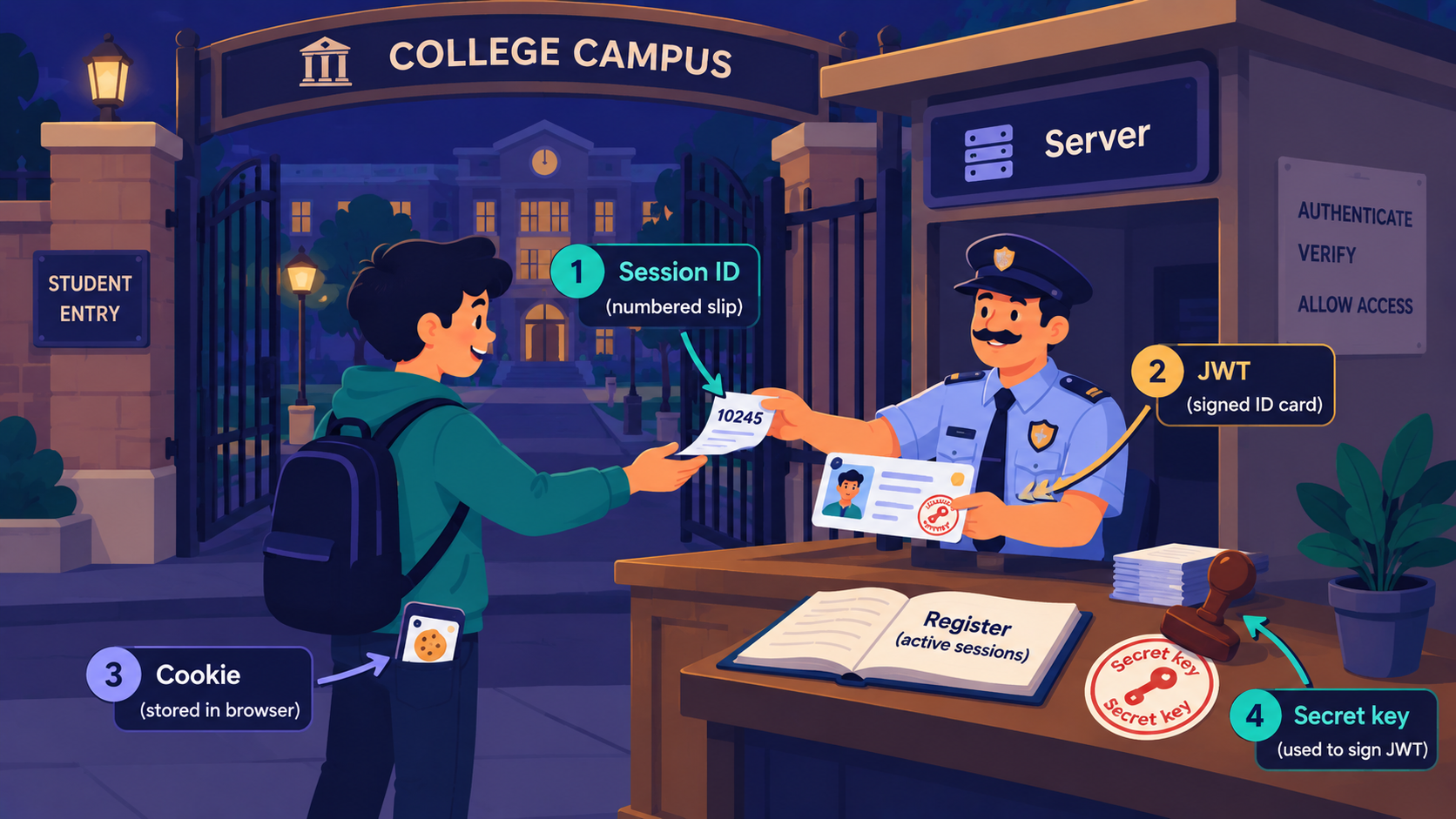
Analogy: The College Campus Gate
Imagine a college with a guard at the main gate. Every student must prove they belong before entering.
Server = the campus gate and its guard
Login = showing your admission proof on day one
Session ID = a numbered visitor slip, while the guard keeps a register
JWT = a signed ID card with your details printed on it
Cookie = the pocket where you keep the slip or card
Secret key = the college's official stamp
What is a session?
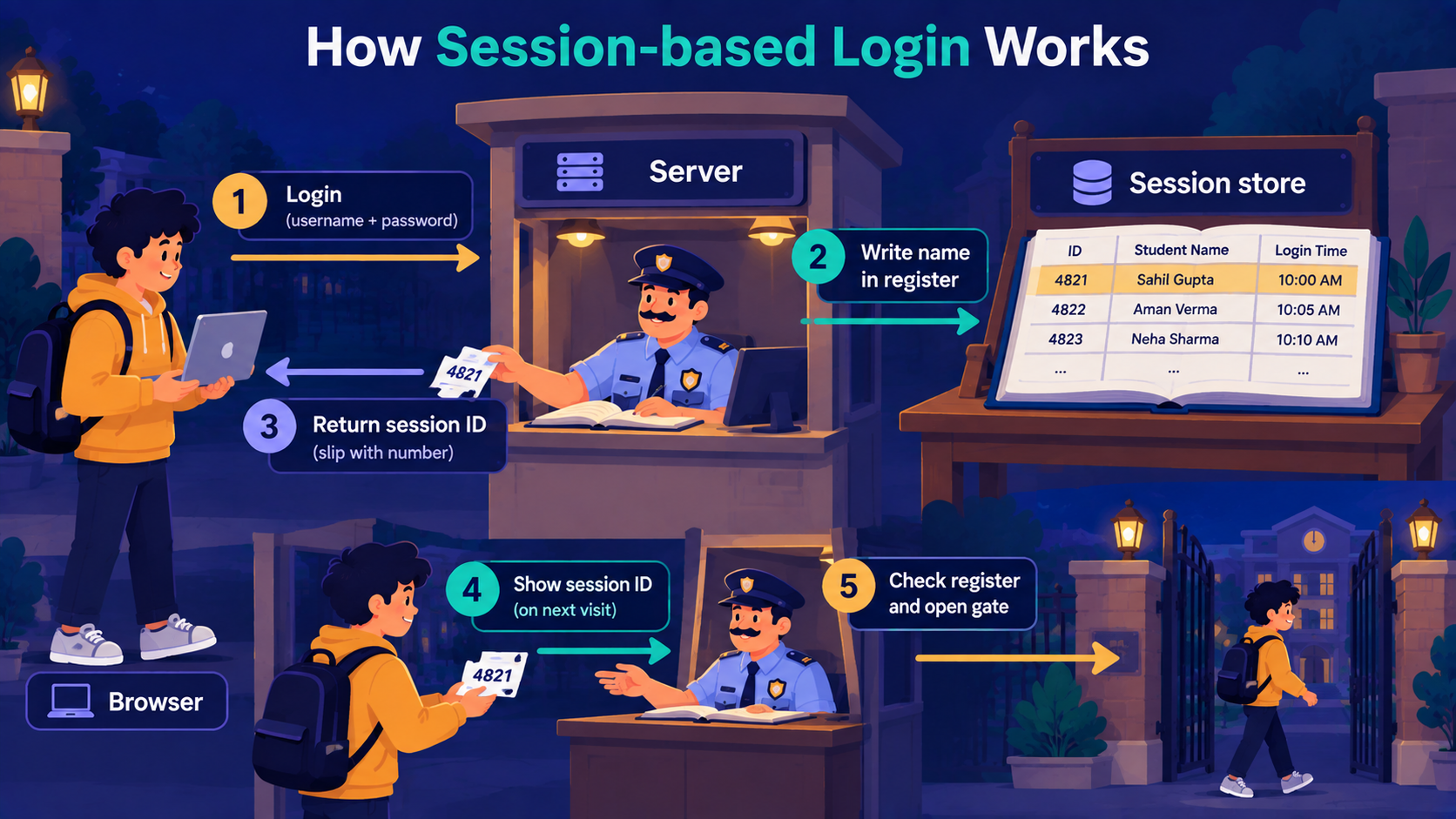
A session is a record the server keeps about a logged-in user, found later using a unique ID.
In our analogy, the guard writes your name in his register and gives you slip number 4821. Next time, you only show the slip. He checks the register and lets you in.
How it works in steps:
The user sends an email and password.
The server verifies them and creates a record, like
{ userId: 42 }.The server sends back only the session ID.
The browser sends that ID with every request.
The server looks up the ID and finds the user.
Why do we need it?
Because HTTP forgets. A session gives the server a memory, and the memory lives on the server, where we control it.
Here is a small Express example. We avoid advanced options here, because confidence comes first.
import session from "express-session";

// Create a reusable session instance
const sessionMiddleware = session({
    secret: "my-secret",
    resave: false, // Prevents resaving session if it wasn't modified
    saveUninitialized: false // Don't create sessions for unauthenticated users
});

// Apply session only to the /login route
app.post("/login", sessionMiddleware, (req, res) => {
    req.session.userId = 42;
    res.send("Logged in");
});

// Apply session only to the /profile route
app.get("/profile", sessionMiddleware, (req, res) => {
    if (!req.session.userId) {
        return res.status(401).send("Login first");
    }

    res.send(`Welcome user ${req.session.userId}`);
});
Note
By default, express-session keeps data in server memory. That is fine for learning. In production, people store sessions in Redis or a database.
A session has one big advantage. To log someone out, you delete one record, and they are out immediately.
The session ID has to travel with every request. That is where cookies come in.
What is a cookie?
Many beginners think a cookie is a login method. That's not true.
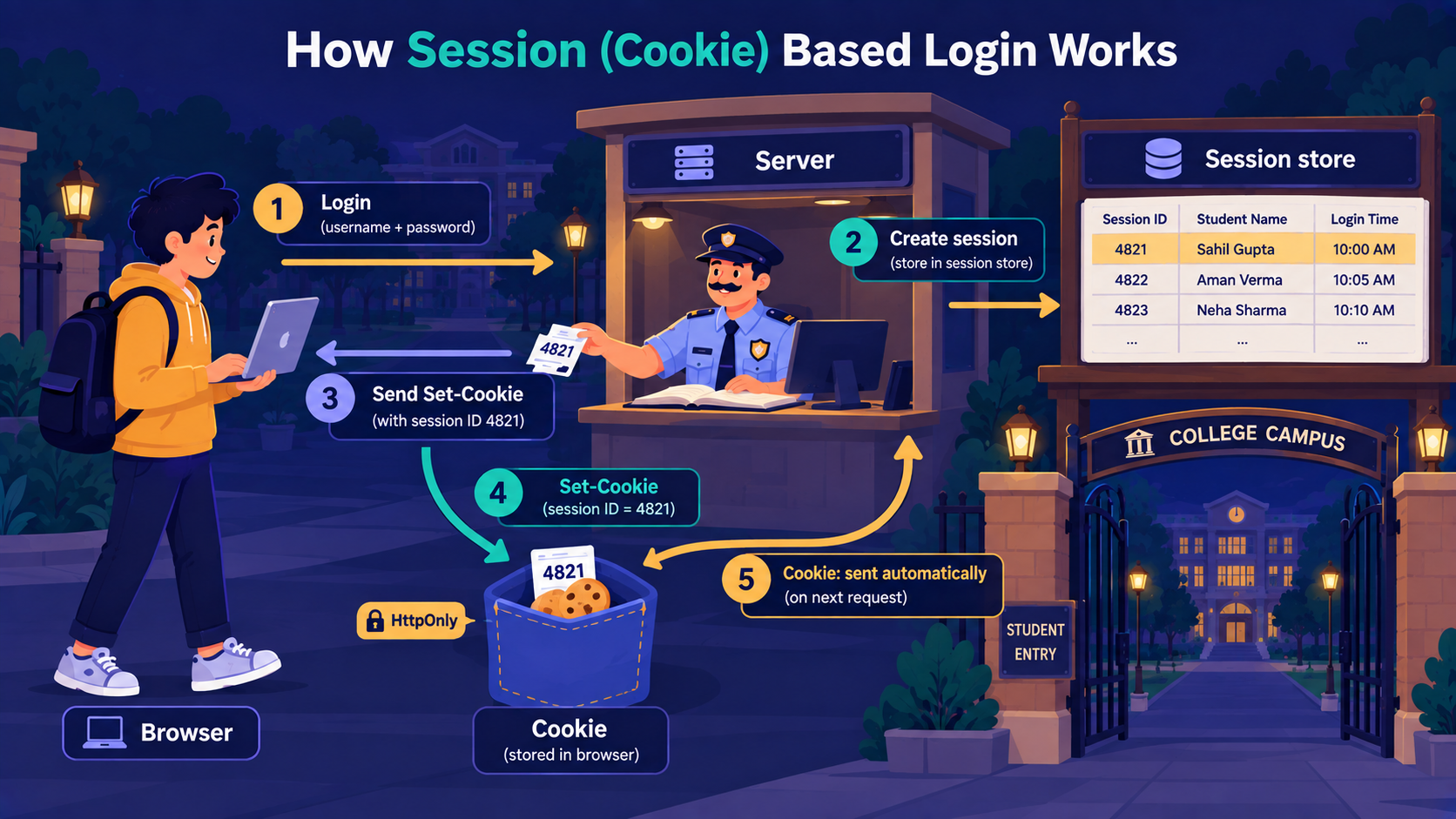
A cookie is a small piece of data that the browser stores and sends automatically with every request to the same site.
The server asks the browser to save it using a Set-Cookie header. After that, the browser attaches it in a Cookie header, without any extra code from you.
You can use Postman application to send request.
1. Send a POST request to http://localhost:3000/login.

2. Open the 'Headers' tab of the response and look for Set-Cookie: connect.sid=....

3. Send a GET request to http://localhost:3000/profile. Postman sends the cookie automatically, and you get Welcome user 42.

4. Now delete the cookie from Postman's cookie manager and send '/profile' again. You get Login first, because the browser, or here Postman, has lost its slip.
Important Rule
A cookie is the carrier, not the method. A session ID usually travels inside a cookie, but a JWT can travel inside one too.
When a cookie holds login data, mark it HttpOnly so browser JavaScript cannot read it.
Sessions keep the data on the server. Now the next question: what if the server kept nothing, and the proof itself carried the data? That is a JWT.
What is a JWT?
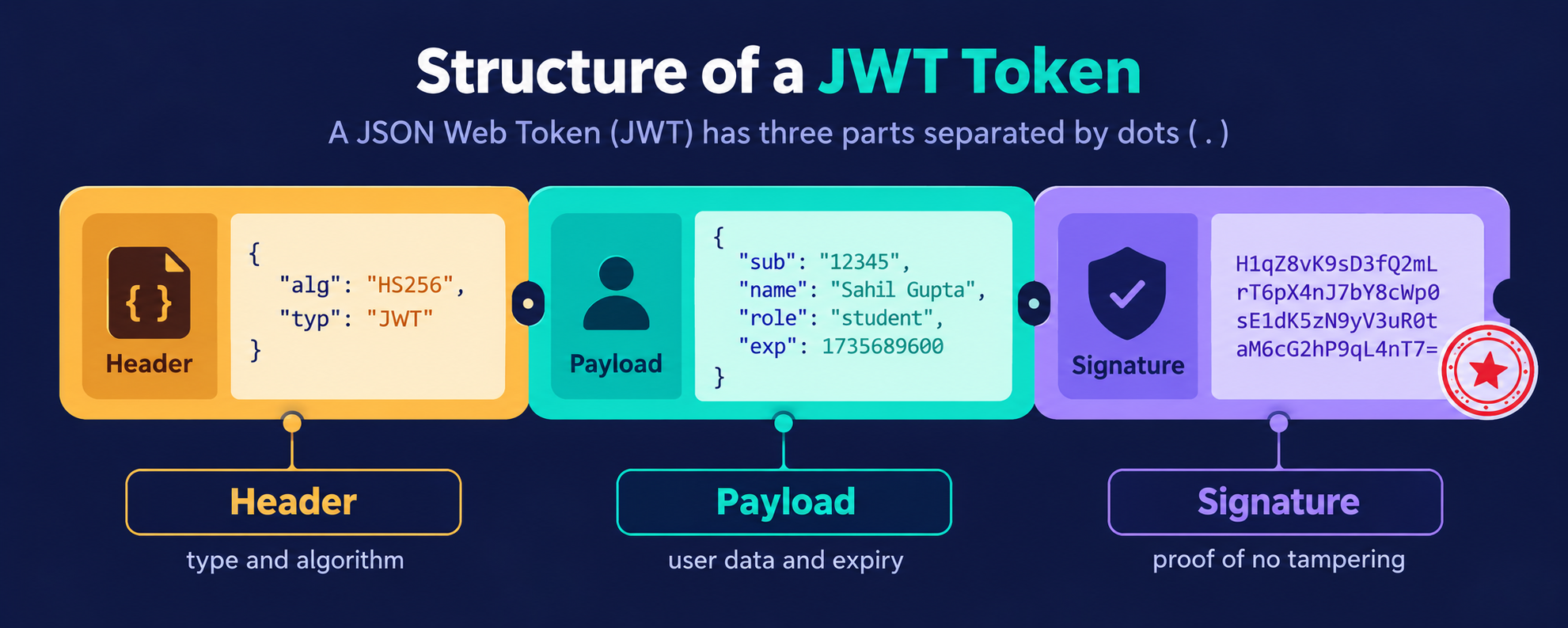
A JWT (JSON Web Token) is a signed token that carries the user's information inside it.
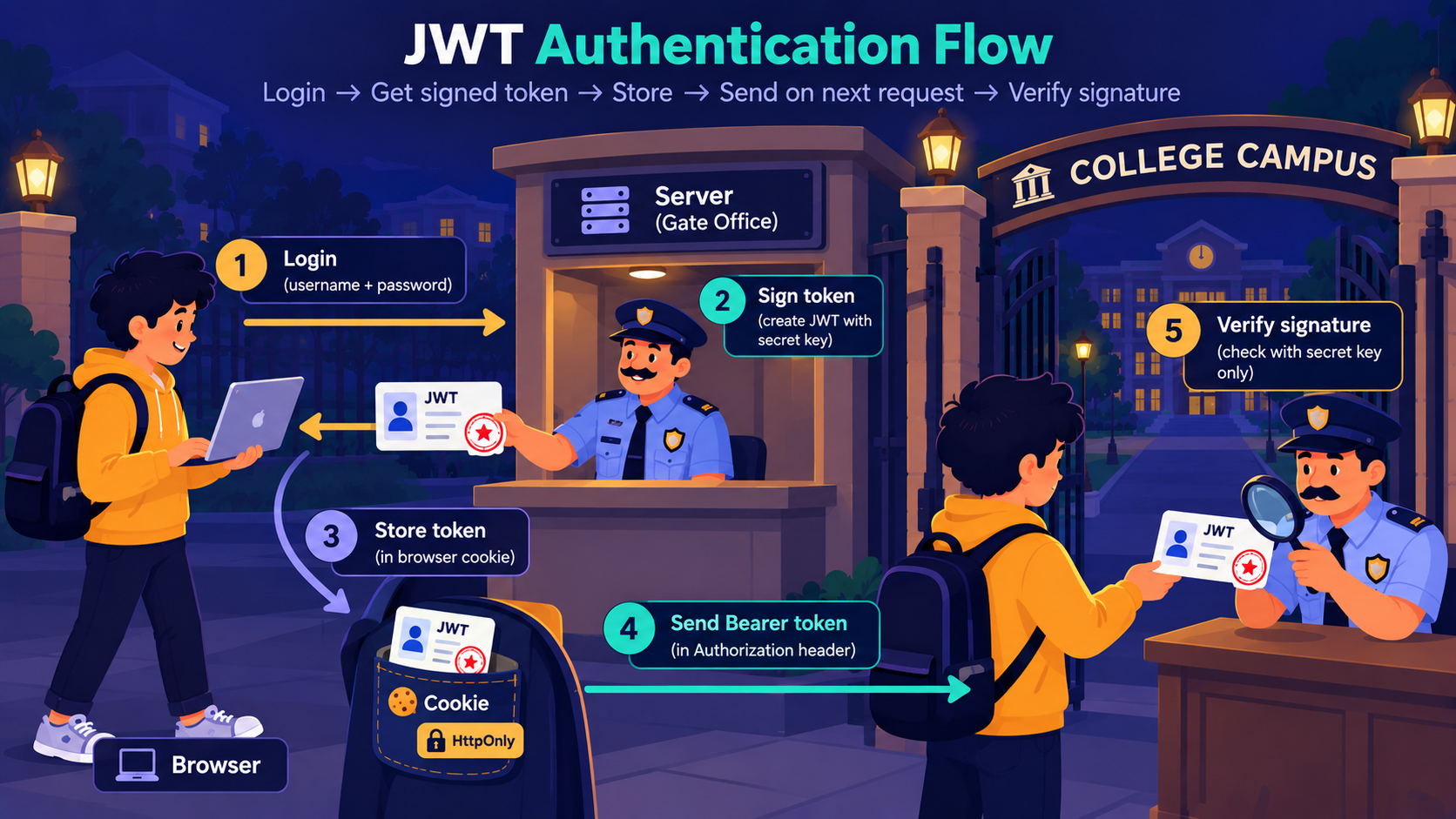
In our analogy, this is the signed ID card. The guard does not open any register. He checks the college stamp on the card and lets you in.
A JWT has three parts, joined by dots:
Header = the token type and signing algorithm
Payload = the data, such as
userId,role, and expiry timeSignature = proof that nobody changed the token
You can create and read one in Node:
import jwt from "jsonwebtoken";

const token = jwt.sign({ userId: 42 }, "my-secret", { expiresIn: "15m" });

console.log(jwt.decode(token));
// { userId: 42, iat: ..., exp: ... }
How it works in steps:
The user logs in with email and password.
The server creates a token and signs it with its secret key.
The client stores the token.
The client sends it as
Authorization: Bearer <token>.The server verifies the signature. No lookup is needed.
Note
The payload is encoded, not encrypted. Anyone can read it. Never put a password or private data inside a JWT.
The trap is cancelling. The server keeps no record, so a valid token works until it expires. Keep expiry short.
Stateful vs stateless: what is the real difference?
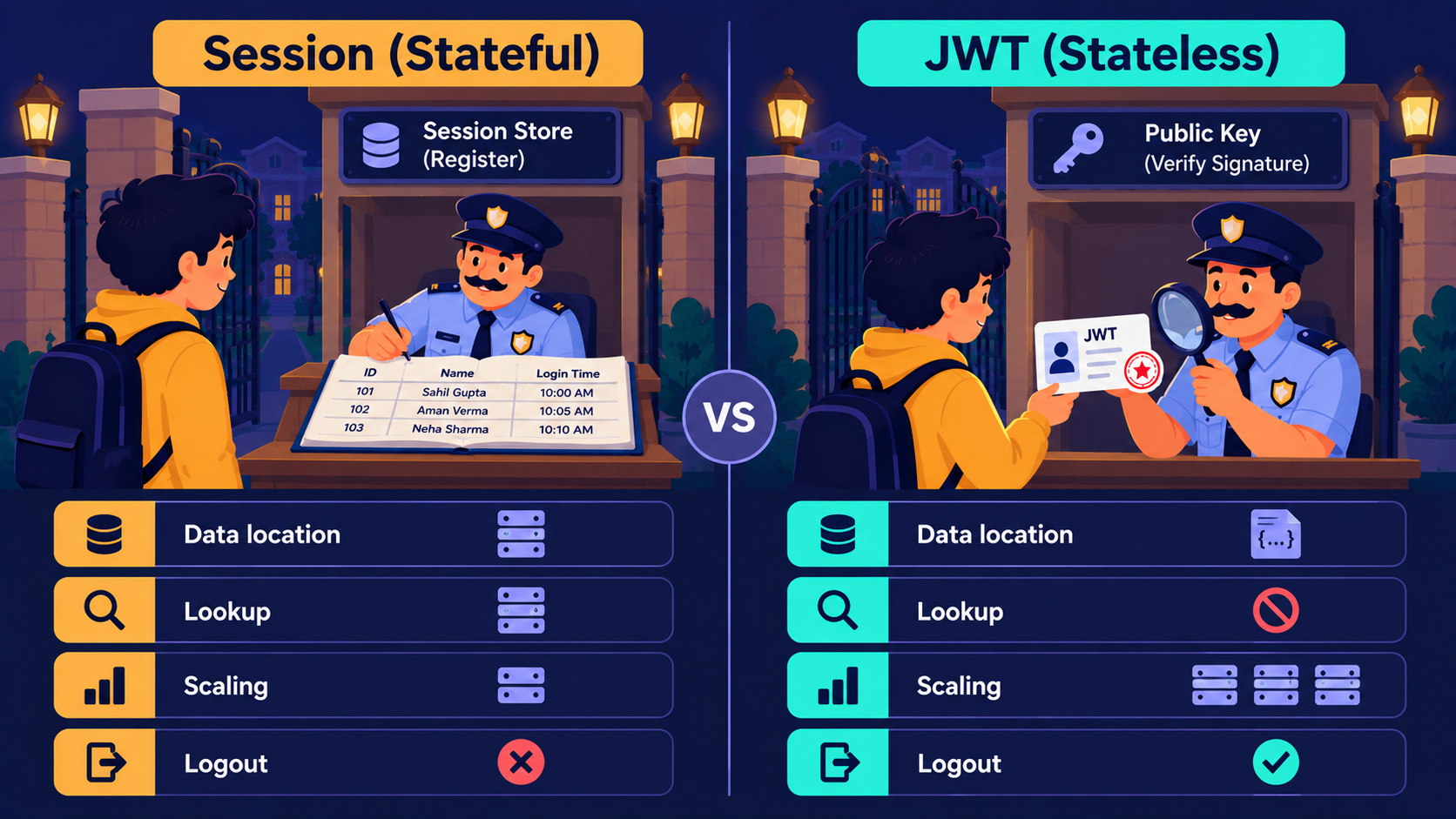
Stateful means the server remembers you. Stateless means the server remembers nothing, and the token carries everything.
Sessions are stateful, because the register lives on the server. JWT is stateless, because the card carries the details.
Now that we know both, here is how they compare.
| Point | Session | JWT |
|---|---|---|
| Where user data lives | Server | Inside the token |
| Lookup on every request | Yes | No, only signature check |
| Scaling to many servers | Needs a shared store | Easy, any server can verify |
| Logout or ban | Instant | Hard before expiry |
| Usually stored in | Cookie | Cookie or app storage |
| Best fit | Websites | APIs and mobile apps |
When should you use each one?
Use sessions when:
You build a normal website with server-rendered pages.
You need instant logout or the power to ban users.
You run a single backend.
Use JWT when:
Your API serves a mobile app or a separate frontend.
Many services must verify the same user.
You want the server to avoid a database lookup on each request.
If you are unsure, ask three questions.
Do I need instant logout?
Do I have more than one server?
Is my client a browser only, or also a mobile app?
Real apps often mix both. A short-lived JWT is paired with a server-stored refresh token. We will build the JWT side in the next article.
How all of these work together
Let us walk through our campus one last time.
A browser app with an Express backend usually uses a session. The guard gives a visitor slip, and the slip rides in a cookie.
A mobile app or a separate frontend usually uses a JWT. The signed ID card is sent in the Authorization header, and nobody checks a register.
Cookie is the pocket. Session and JWT are what you keep inside it.
Assignment: Spot the method
For each case, decide between session and JWT, and say why.
A college admin panel that must log out a teacher instantly.
A food delivery mobile app talking to three backend services.
A personal blog dashboard on one server.
Solution:
1. Session, because instant logout is required.

2. JWT, because many services verify the same user.

3. Session, because one server and simple needs make it the easiest choice.
Conclusion
A session is a record the server keeps and finds using an ID.
A cookie is a browser storage box that sends data automatically.
A JWT is a signed token that carries the user's data inside it.
Stateful means the server remembers, and stateless means the token remembers.
Pick sessions for control, and JWT for scale and multiple clients.
If this felt like a lot, that's okay. What matters is understanding the flow, because the code is only a small part of it.
What's Next?
In the next article, we build JWT Authentication in Node.js Explained Simply. How do we write a login route that issues a token, and a middleware that checks it?
If you found this useful, drop a comment or a reaction.