Where Do Uploaded Files Go? Storing and Serving Them in Express
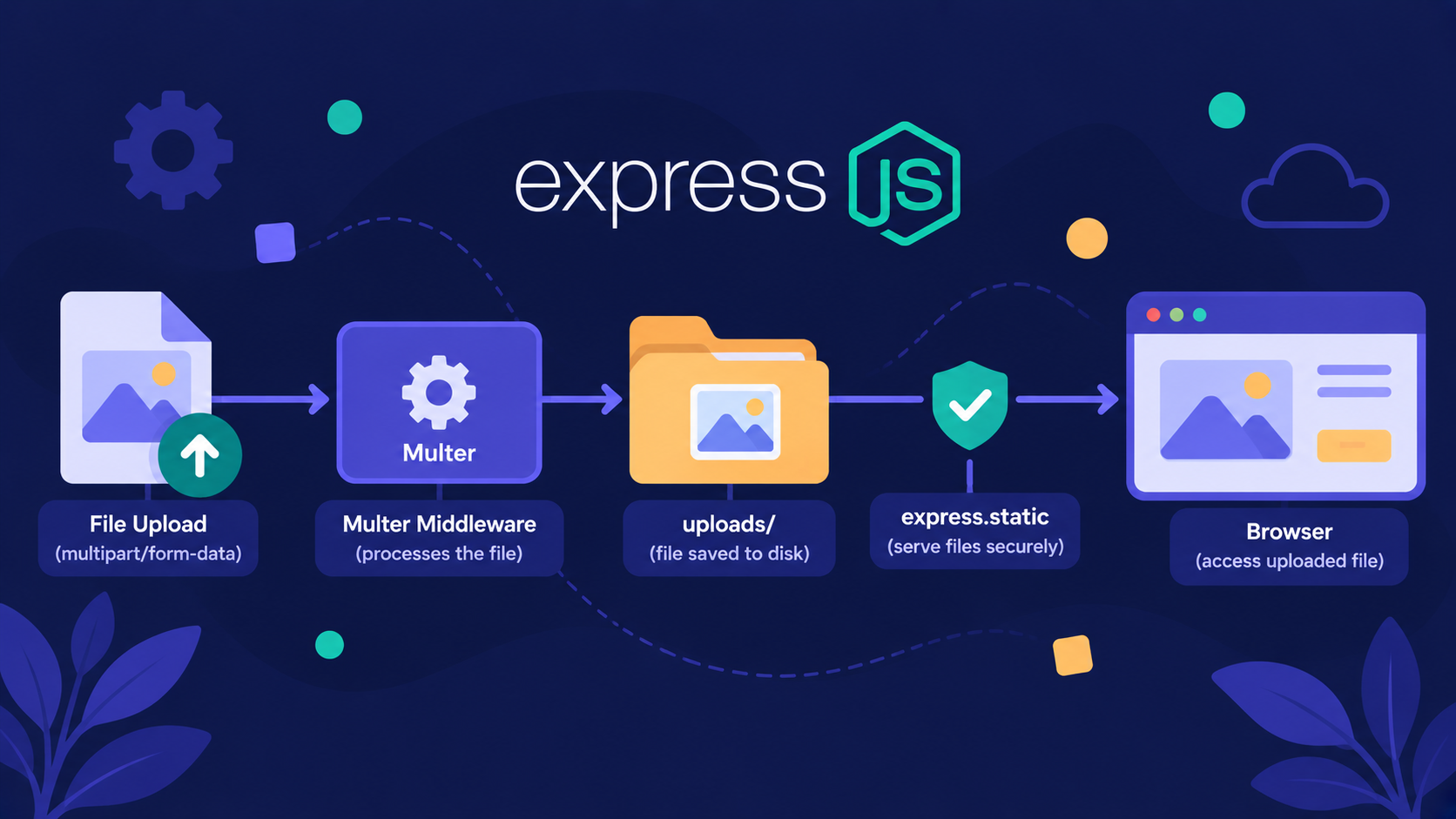
Where do uploaded files go after Multer saves them?
Many beginners think an uploaded file lives inside the request, or inside the database. That's not true.
A file is just bytes written to a disk. Your server must decide where those bytes are kept, and how the browser can reach them.
File storage decides where uploaded bytes live.
Static file serving lets the browser fetch them through a URL.
Analogy: The School Library
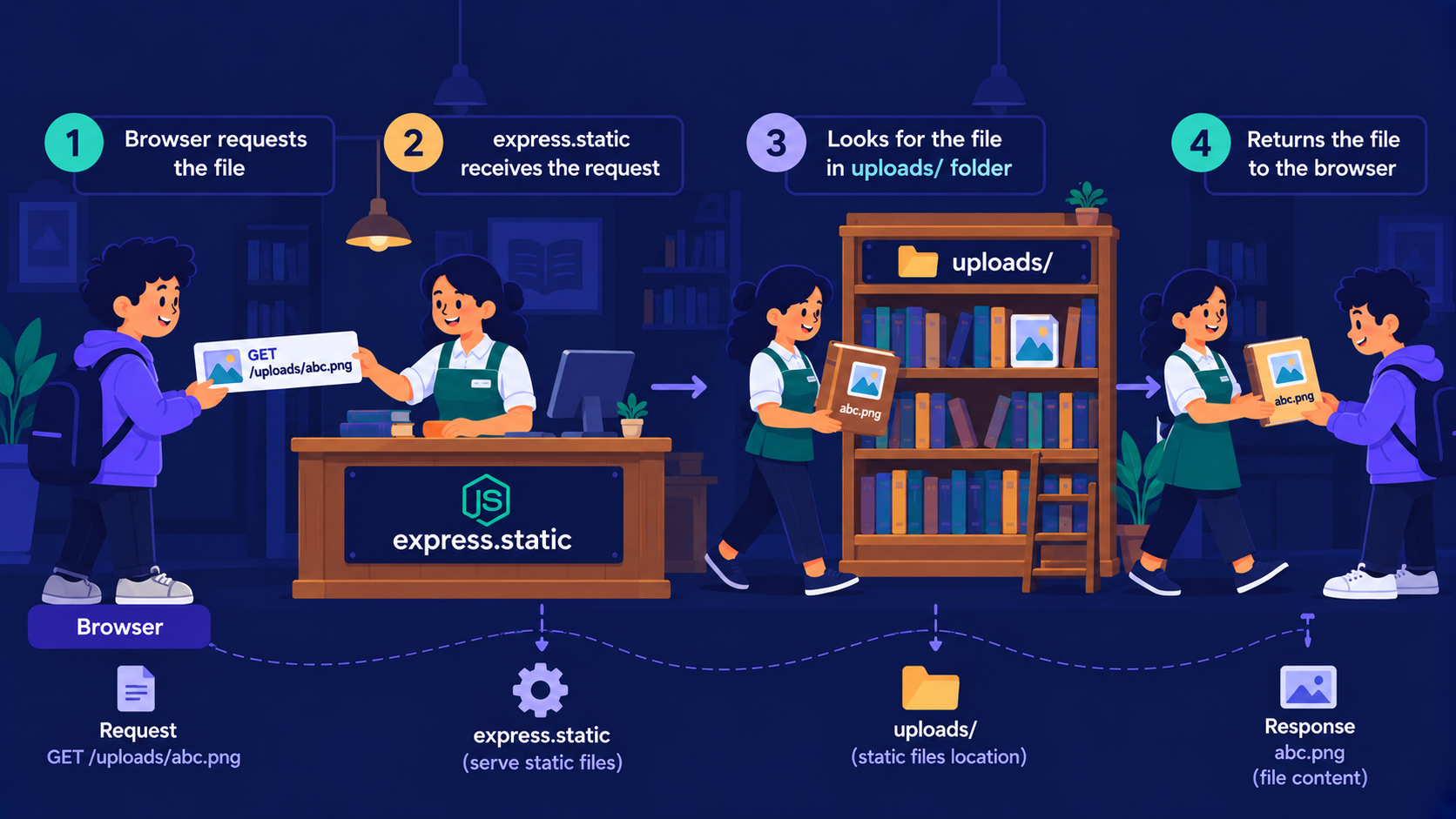
Think of your server as a school library.
uploads folder = the bookshelves
express.static = the librarian's counter
File URL = the shelf slip a student carries to the counter
Multer = the person who brings new books in
Security rules = the library rules (who enters, what books are allowed)

Books need a shelf before the librarian can hand them over. So where should the shelf be?
Local storage vs external storage: where should the shelf be?
Local storage is a shelf inside your own building. External storage (Amazon S3, Cloudinary) is a big warehouse across town.
| Feature | Local storage | External storage |
|---|---|---|
| Setup | One folder, zero accounts | Account, keys, SDK |
| Cost | Free | Pay per use |
| Scaling | Limited to one server's disk | Grows with you |
| Survives redeploy? | Not always | Yes |

Note
Serverless platforms like Vercel don't give you a permanent writable disk. Local storage works well for learning and small projects. For production on such platforms, use external storage.
Here is a simple folder-based structure:
project/
├── src/
│   └── server.js
├── uploads/
│   ├── avatars/
│   └── documents/
├── .gitignore
└── package.json
Add uploads/ to .gitignore. User files should never end up in your repository.

Files on shelves are useless if nobody can ask for them. That is the librarian's job.
How does Express serve files from a folder?
Your browser cannot read your server's folders. It can only send requests to routes.
If no route matches /uploads/photo.png, Express replies with a 404. The built-in express.static middleware fixes this.
import express from "express";
import path from "node:path";
import { fileURLToPath } from "node:url";

const app = express();
const __dirname = path.dirname(fileURLToPath(import.meta.url));
const uploadDir = path.join(__dirname, "uploads");

app.use("/uploads", express.static(uploadDir));
Here is what happens when the browser asks for a file:
The browser sends
GET /uploads/abc.png.Express sees the
/uploadsprefix and hands the request toexpress.static.The middleware removes the prefix and looks for
abc.pnginside the folder.If found, it sends the file with the correct
Content-Type. If not, the request moves on and ends in a 404.
Important Rule
Always use an absolute path built with path.join. A relative path like "uploads" depends on the folder where you started Node, and breaks easily.
The shelf is ready and the counter is open. Now, how does a student get the shelf slip?
How do you access an uploaded file through a URL?
After Multer saves a file, req.file.filename tells you the saved name. Send back a URL built from it.
app.post("/upload", upload.single("avatar"), (req, res) => {
  res.json({ url: `/uploads/${req.file.filename}` });
});
Save this URL path (or just the filename) in your database. Never store the file itself there.
Now the browser can use it like any image link:
<img src="http://localhost:8080/uploads/3f2a9c1e.png" alt="User avatar" />
You can also test it in postman application:
GET http://localhost:3000/uploads/3f2a9c1e.png
A 200 OK with Content-Type: image/png means the librarian found the book.
But anyone with this link can fetch the file. So what stops a stranger from handing the library something dangerous?
Security considerations: what are the library rules?
Important Rule
Never trust anything the client sends. The file name, the file type, and the file size can all be faked.
Here is a safer Multer setup:
import multer from "multer";
import crypto from "node:crypto";

const ALLOWED = { "image/jpeg": "jpg", "image/png": "png", "image/webp": "webp" };

const storage = multer.diskStorage({
  destination: uploadDir,
  filename: (req, file, cb) => {
    cb(null, `${crypto.randomUUID()}.${ALLOWED[file.mimetype]}`);
  },
});

const upload = multer({
  storage,
  limits: { fileSize: 2 * 1024 * 1024 },
  fileFilter: (req, file, cb) => cb(null, Object.hasOwn(ALLOWED, file.mimetype)),
});
Why each line matters:
Random file names stop users from overwriting each other's files. They also block tricks like
../../server.jsin the original name.Extension from an allow-list means a
.htmlor.exefile never lands in the folder.Size limits protect your disk from huge uploads.
Serve only the uploads folder. Never point
express.staticat your project root.
Note
file.mimetype is declared by the client, so it can lie. For stronger checks, inspect the real file signature with a package like file-type. For private files, such as invoices, skip express.static and serve them through a route that checks who is logged in.
All the pieces are ready. Let's see how they work together.
How do storage, serving, and security work together?
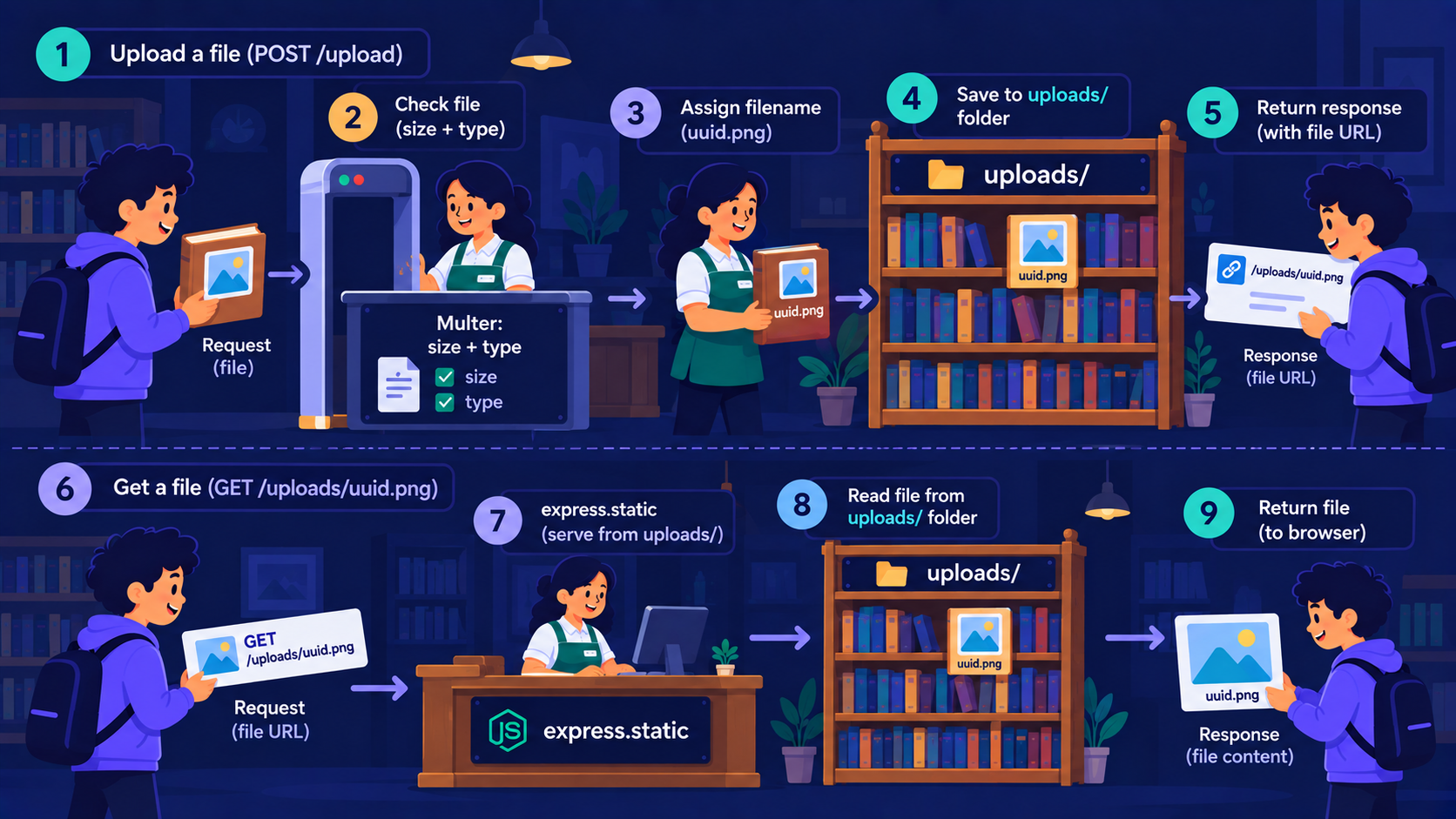
Follow one upload from start to finish:
The client sends a file to
POST /upload.Multer checks the size and type.
The file is saved with a random name in
uploads/.The server returns the URL.
The browser requests that URL.
express.staticfinds the file and sends it back.
In library terms: the new book is checked at the door, given a random shelf number, and the student gets a slip to collect it later.
Hands-on assignment
Try it yourself, then open the solution
Task: Build an Express server where POST /upload accepts only PNG and JPEG files up to 1 MB, saves them with random names, and returns a working URL. Open that URL in your browser.
Solution:
-
Reuse the
ALLOWEDmap and removeimage/webp. -
Change the limit to
1 * 1024 * 1024. -
Add
app.use("/uploads", express.static(uploadDir)). -
Upload with Postman
http://localhost:3000/upload.Click on Body, then select form-data, after that Key = avatar and select File instead of Text, at the end upload file using value field.
-
Paste the returned URL after
http://localhost:3000.
Conclusion
Storage decides where uploaded bytes live: local folder or external service.
express.static turns a folder into URLs the browser can request.
File URLs are saved in the database, not the file.
Security means random names, allowed types, size limits, and never serving more than the uploads folder.
If this felt like a lot, that's okay. What matters is understanding the flow: upload, validate, store, serve.
What's Next?
Users can now upload and view files. But how does your server know who is making each request? In the next article, we'll compare Sessions, JWT, and Cookies.
If you found this useful, drop a comment or a reaction.